
Announcements
Add Images of Islamic Phrases to Your WordPress Posts using Shortcodes


MuslimMatters.org presents Islamic Graphics: a WordPress plugin that allows you to easily insert images of common Islamic phrases directly into your posts and pages via shortcodes.
- Islamic phrases include:
- ‘alayhis salam –

- rahimaha Allah –
- rahimahu Allah –
- rahimahum Allah –
- radiallahu ‘anha –
- radiallahu ‘anhu –
- radiallahu ‘anhum –
- sallalahu ‘alayhi wa salam –
- subhanahu wa ta ‘ala –


Both black and white versions of each graphic are provided.
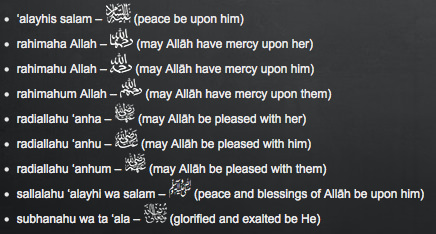
Romanized text and the English translation can also be inserted to assist readers who do not know Arabic, as shown below:
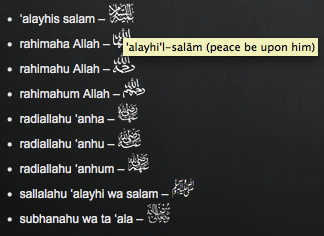
Images only - islamic phrase appears upon mouse rollover.
Keep supporting MuslimMatters for the sake of Allah
Alhamdulillah, we're at over 850 supporters. Help us get to 900 supporters this month. All it takes is a small gift from a reader like you to keep us going, for just $2 / month.
The Prophet (SAW) has taught us the best of deeds are those that done consistently, even if they are small. Click here to support MuslimMatters with a monthly donation of $2 per month. Set it and collect blessings from Allah (swt) for the khayr you're supporting without thinking about it.
Images with translation - English translation appears in brackets next to image.
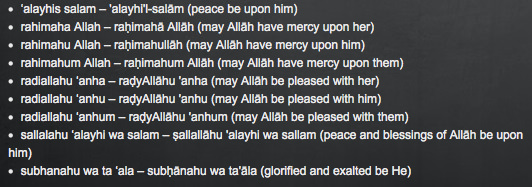
Romanized text with translation - a text only option.
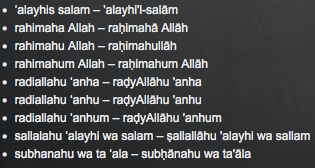
Romanized text only
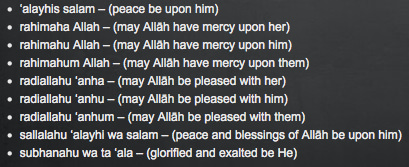
Translation only
Click here to download the plugin for free – please don’t forget to rate it. :)
- Updates:
- 26th April 2017: version 1.2.0 – A new set of images has been added in the form of SVG files for a more consistent look across articles and for smoother scaling. PNG fallback is included for older browsers. Default image size increased to 25 x 25 pixels. This can be changed by the user as described in the FAQ.
- 1st Feb 2012: version 1.1.0 – Options page added under Dashboard > Settings > Islamic Graphics. Now you can choose to display images with or without accompanying text, set the default image height, and default colour.
- 23rd Jan 2012: version 1.0.7 – Alt and title text added. Hover your mouse over an Islamic graphic to see the transliterated version of the phrase, as well as the meaning in English.
- 14th Jan 2012: version 1.0.6 – New images added! Rahimahullah, rahimaha Allah, rahimahum Allah.
- 13th Jan 2012: version 1.0.5 – Changes made to improve image quality. JazakAllah khair Saqib for the recommendations.
Keep supporting MuslimMatters for the sake of Allah
Alhamdulillah, we're at over 850 supporters. Help us get to 900 supporters this month. All it takes is a small gift from a reader like you to keep us going, for just $2 / month.
The Prophet (SAW) has taught us the best of deeds are those that done consistently, even if they are small. Click here to support MuslimMatters with a monthly donation of $2 per month. Set it and collect blessings from Allah (swt) for the khayr you're supporting without thinking about it.


The Arithmetic Of Longing: On Loneliness, Desire, And Learning To Want Well

Far Away [Part 20] – Among the Afghans

The Legacy Of Professor John Esposito: The Scholar Who Refused To Turn Islam Into An Enemy

Tahajjud: A Call to All Pajama Heroes

Thinking Long-Term: The Legacy of Yahiya Emerick

When Tawakkul Isn’t Enough: Why Financial Silence Hurts Marriages
Thinking Long-Term: The Legacy of Yahiya Emerick

[Podcast] Shifa Saltagi Safadi and the Formula for Writing Muslamic Books

An Inconvenient American in Syria: The Curious Case of Bilal Abdul-Kareem
The Legacy Of Professor John Esposito: The Scholar Who Refused To Turn Islam Into An Enemy

The Best Actions for Eid al-Adha [Imam Dawud Walid]

Coming Full Circle: Who Are You Now? | Night 30 with the Qur’an

Running Away From Who We Are | Night 29 with the Qur’an

Building From the Ground Up: Week 4 Recap | Night 28 with the Qur’an

The Muslim You Are Becoming | Night 27 with the Qur’an
MuslimMatters NewsLetter in Your Inbox

Sign up below to get started
-

 #Life1 month ago
On Infertility And Not Having A Child: A Letter To Couples Going Through The Silent Struggle
-
#Islam1 month ago
The Woman Who Corrected Umar: Mahr, Tafseer, and Advocacy
-
#Life1 month ago
So You Want To Become A Lawyer? [Part I] – On Faith, Duty, And The Legal Profession
-
#Culture1 month ago
Far Away [Part 17] – The Caravan





Siraaj
January 12, 2012 at 10:26 PM
Btw, this plugin was written by the author of this article (awesome job writing the plugin). It was done to solve a problem we had in our upcoming new version of MM, insha’Allah ;)
Siraaj
Mehzabeen (iMuslim)
January 13, 2012 at 8:44 AM
It’s actually surprisingly easy to write a simple WordPress plugin masha’Allah… especially the one above, which is essentially one function. :D I will definitely be writing more if and when the need arises. It’s quite fun. [/nerd] :P
Zahid
January 12, 2012 at 10:58 PM
Salaam alaikum,
Does any techie out there know how we could use these inline in MS Word etc? I do translation work and these would be very beneficial. Thanks.
Mehzabeen (iMuslim)
January 13, 2012 at 8:25 AM
Wa ‘alaykum salam wa rahmatullah
The SAW graphic is based on the unicode symbol: ﷺ. The other graphics bar SWT were based on the font “Islamic Phrases”, designed by AlMedia.net, which is available to download for free, for personal use only, from http://www.almedia.net/free-arabic-fonts.htm. Therefore you could create custom keyboard shortcuts in Word to quickly insert these symbols insha’Allah.
I found the SWT symbol online, and re-drew it as it was not very good quality.
That’s the only one you would not be able to embed as easily… perhaps you could use a keyboard shortcut to embed the image… not sure if that’s possible. Or perhaps you could generate your own font (Google for more info) and do as above insha’Allah.
Mehzabeen (iMuslim)
January 14, 2012 at 8:14 AM
You might also be able to use Word’s autocorrect function, and use a similar shortcode system, e.g., where [saw] is replaced with the unicode symbol.
Zahid
November 4, 2012 at 8:27 AM
Barakallahu feek! I just read this article again 10 months later and found that you had replied back then! :)
Wael - IslamicAnswers.com
January 13, 2012 at 1:47 PM
Ma-sha-Allah good job. I use WordPress for all my websites and this will come in handy.
Yasmin
January 13, 2012 at 4:26 PM
Jazakallah khair for creating this very useful plugin!
Nahyan
January 14, 2012 at 2:55 AM
very nice mashaAllah, will put it to use.
Jazakallahukhair.
Mehzabeen (iMuslim)
January 14, 2012 at 7:52 AM
JazakumAllah khair – please rate the plugin when you download it from the WordPress.org site. :)
Abu Ibrahim Ismail
January 18, 2012 at 3:21 PM
Thank you for this plugin. I’ll install it on my website as soon as this SOPA blackout is over, Inshallah.
Khalid Hussain
January 19, 2012 at 6:24 PM
You could also use AutoHotkey and then you could use it in all applications supporting UTF-8 font.
Mariya
January 22, 2012 at 7:19 PM
Jazak Allah for the work and it looks very beautiful.
Inshallah, I will use it when required. However, they are so small and cannot be easily read by a person who is not well accustomed to these greetings and phrases. A convert or even not a well educated muslim does not know the difference between anha, anhu, and anhum. The greeting after the prophets name is obvious. Most people know that but not others. So, I think we should still write out in some cases.
This is only my opinion.
Mehzabeen (iMuslim)
January 23, 2012 at 1:48 PM
Salam Mariya
Thanks for bringing up this point. I have now added alt and title text to the images, so if you place your mouse pointer over the Islamic graphic you should see the transliterated phrase and the meaning in English. E.g., raḥimahā Allāh (may Allah have mercy upon her). I hope this will make things easier for those who are not familiar with the phrases insha’Allah. :)
Pingback: Add Images of Islamic Phrases to Your WordPress Posts using Shortcodes - Islamic Blog - Articles On Muslims, Islam In uk
Pingback: Add Images of Islamic Phrases to Your WordPress Posts using Shortcodes | iMuslim.tv
Islam
January 30, 2012 at 9:31 AM
Thank you very much for share this plug in. I will install the plugin in my site.
Ahmad Akmal Mohd Idris
February 1, 2012 at 2:12 PM
Salam,
I have a request nor an idea, it is better if you can add in a short form of SWT – subhanallah taala.
MENJ
April 21, 2012 at 12:06 PM
Great effort! This reminds me of the “Islamic Praise” plugin from Usayd Networks:
http://plugins.trac.wordpress.org/wiki/IslamicPraise Perhaps you could take a look at this plugin and incorporate any feature not already in this plugin from that one.
abu yusuf
October 27, 2014 at 11:01 AM
How to use this shortcode in the wordpress post? ,barakallahu fiikum
Rashida Yasin
December 20, 2014 at 2:39 PM
Please add for عليهم السلام
Umm Yusuf
June 15, 2015 at 11:44 AM
Here’s another good one https://wordpress.org/plugins/islamic-phrases/
The one on the article didn’t work for me. I searched for another one and found this. Hope it helps someone.
abu nadia
October 22, 2015 at 10:46 AM
I don’t know how to using it,,there is a plugin?
nurdin nurung
October 31, 2015 at 9:27 PM
Here’s another good one wordpress.org/plugins/islamic-phrases/ test before use it and maybe can working in your site
Abdul
August 15, 2017 at 10:49 PM
can you include [aaza wajal] ?
ahmad
December 28, 2017 at 10:38 AM
thanks
jazakallahu khair
Aleena
April 23, 2018 at 6:07 AM
Great work! Masha ALLAH
Pinay Keto
April 11, 2019 at 1:38 AM
Salam! I am using this plug-in and I am very happy with it. I hope that you can add more phrases, such as InshaAllah